
SMS program
Flote Driver sign-in codes
Flote Driver sends one kind of text message: a one-time passcode that a driver requests in order to sign in. This page documents the program as it works today, including the disclosure shown in the app.
What these messages are
The program is called Flote Driver sign-in codes. Messages are sent by R&E Distribution, LLC d/b/a Flote Distribution for the Flote Driver app, which is operated by FLOTE Software Company.
Every message is a sign-in code that a driver asked for moments earlier. There are no marketing, promotional, scheduled, or recurring messages, and nothing else is sent from this program.
Who can receive codes
Only mobile numbers that a Flote dispatcher has set up for an employed driver can receive a code. Being set up is not the same as consenting: setup makes a number eligible, and the driver consents when they request a code in the app.
If someone enters a number that has not been set up, the app shows the same screen it shows everyone, and no message is sent.
How a driver opts in
- A Flote dispatcher sets up the driver's mobile number in Flote's systems. Only a number set up this way can receive a code.
- The driver installs the Flote Driver build they were given and opens the sign-in screen. The screen shows the SMS disclosure beside the mobile number field, with links to the privacy notice and terms.
- The driver enters their mobile number and taps Send code. This request is the driver's consent to receive a sign-in code at that number.
- One text message with a six-digit code is sent to that number. The driver enters the code in the app.
Consent happens inside the app, on the sign-in screen, at the moment the driver requests a code. Visiting this website does not enroll anyone, and nothing here sends a message.
The disclosure shown in the app
This text appears directly beneath the Send code button on the sign-in screen, followed by links to the privacy notice and terms:
By providing your phone number, you agree to receive sign-in verification codes by SMS from Flote Driver. Message frequency varies by sign-in attempts. Standard message and data rates may apply. Reply STOP to opt out. Reply HELP for help. We will not share mobile information with third parties for promotional or marketing purposes.
What a code message looks like
Your Flote Driver sign-in code is 482913. Never share it — Flote will never ask for it.
The code is 6 digits and expires 60 seconds after it is sent. A driver can request a new code at most once every 30 seconds. Flote staff never ask for a code.
Frequency and cost
One message per code request. How often a driver receives messages depends only on how often they sign in. Standard message and data rates from the driver’s carrier may apply.
STOP, HELP, and getting codes again
- Stop messages
- Reply STOP, UNSUBSCRIBE, QUIT, END or CANCEL. You will get one confirmation, and no further codes will be sent to that number.
- Get help
- Reply HELP or INFO. You will get a reply with support information. You can also email drivers@withflote.com.
- Receive codes again
- Reply START or YES to the same number. You will get one confirmation that codes are enabled again.
The sign-in screen
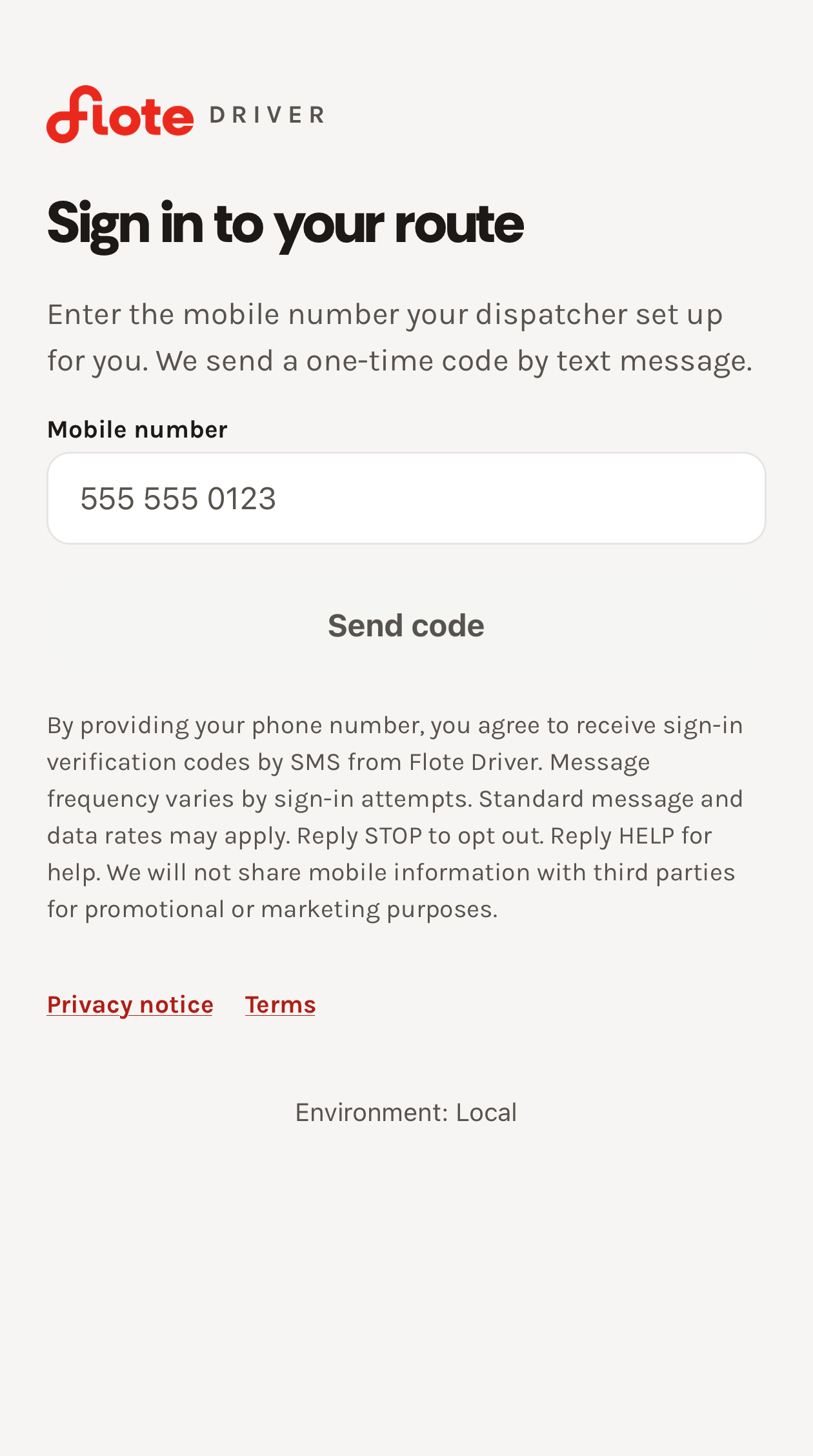
The full text of the sign-in screen’s number-entry step, reproduced as selectable text:
- Heading
- Sign in to your route
- Instruction
- Enter the mobile number your dispatcher set up for you. We send a one-time code by text message.
- Field label
- Mobile number
- Button
- Send code
- Disclosure
- By providing your phone number, you agree to receive sign-in verification codes by SMS from Flote Driver. Message frequency varies by sign-in attempts. Standard message and data rates may apply. Reply STOP to opt out. Reply HELP for help. We will not share mobile information with third parties for promotional or marketing purposes.
- Links
- Privacy notice · Terms
Policies and contact
- Privacy notice: how the mobile number and messages are handled.
- Terms of use: the SMS program terms and the rules for using the app.
- Support: drivers@withflote.com